My Codex Setup: Sol Plans, Terra Builds, Luna Saves
Four profiles optimize planning, execution, cost, and speed. Published on 22 August 2026 • AI translated
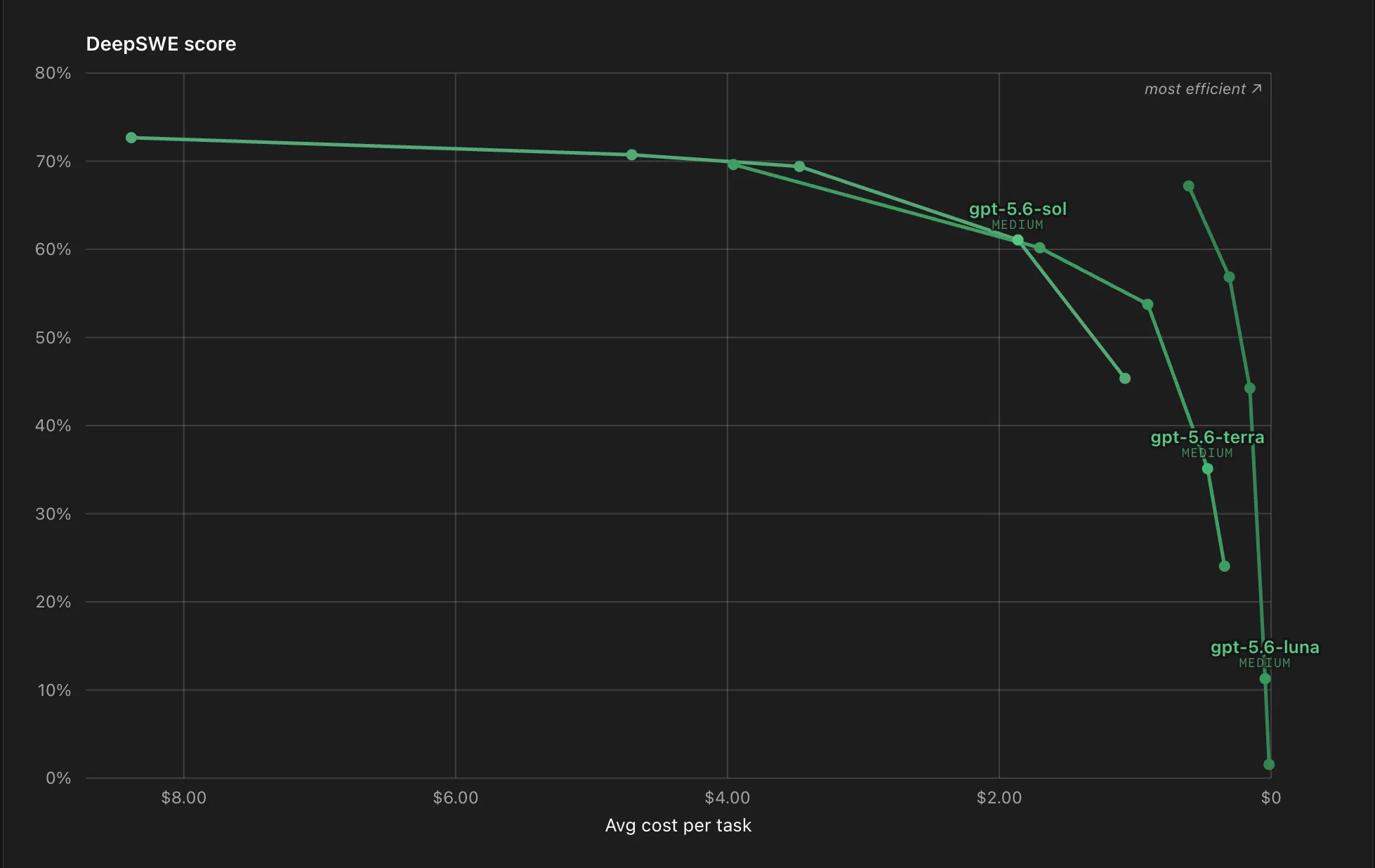
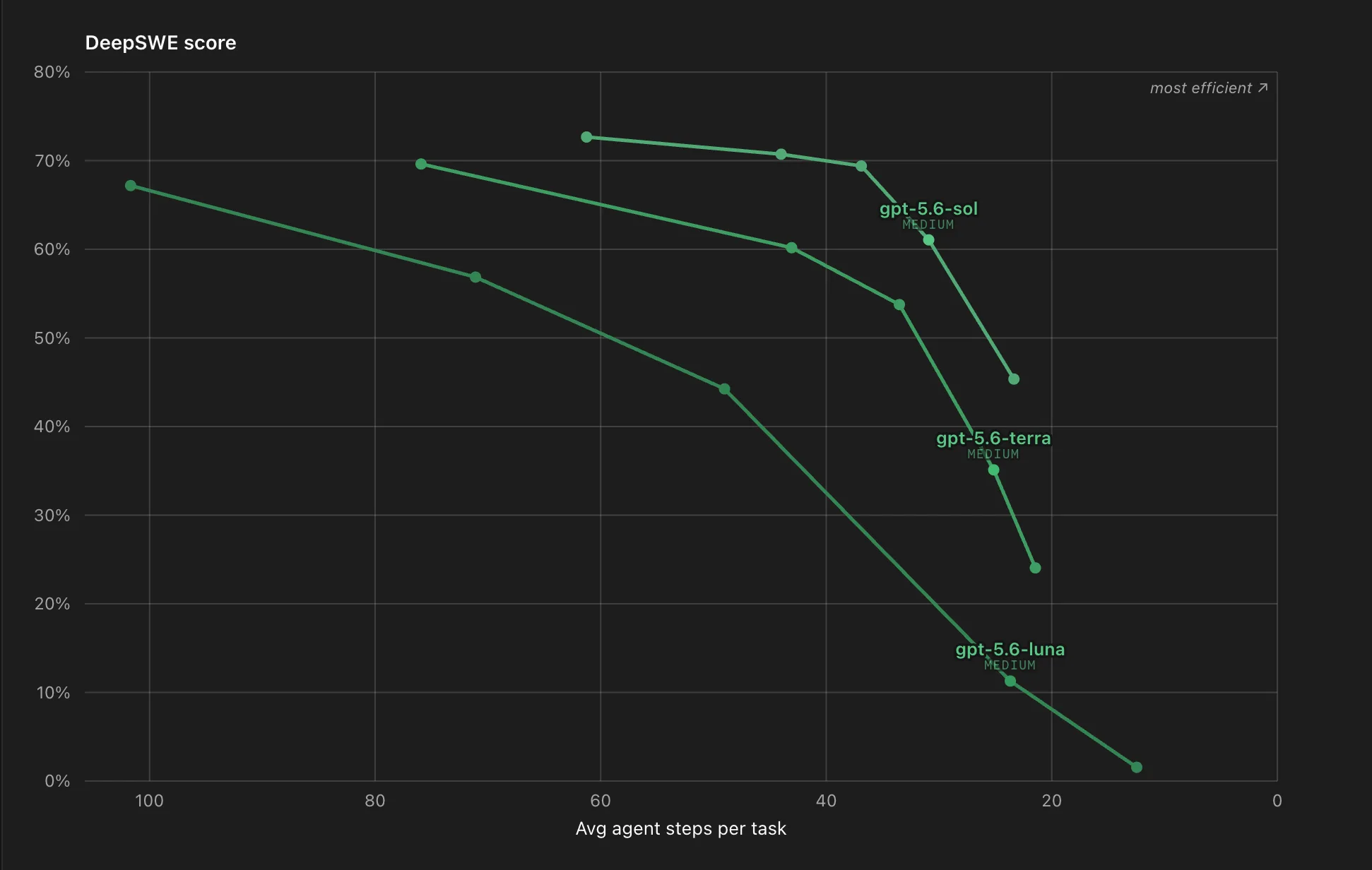
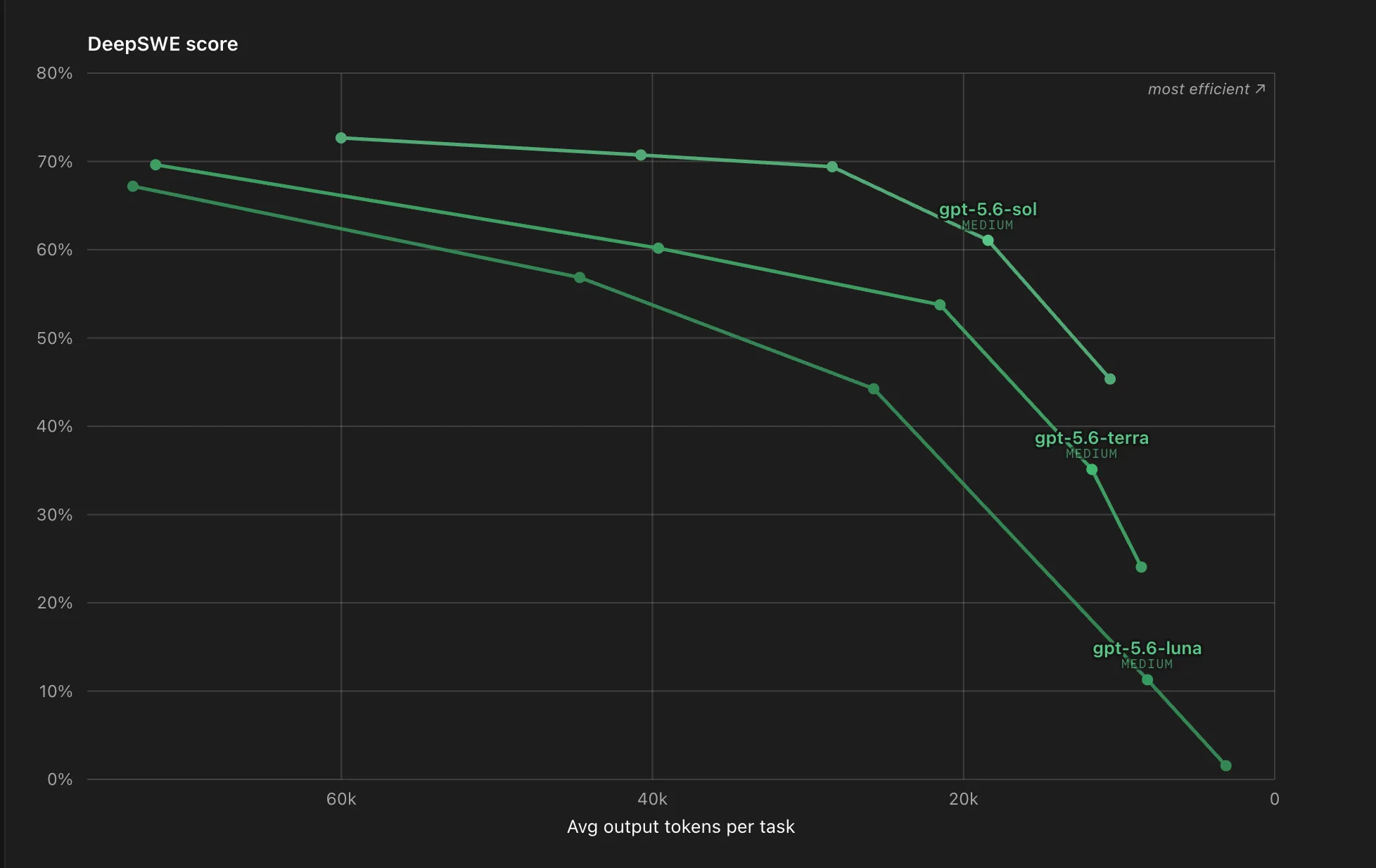
I do not optimize every task for maximum benchmark performance. I look for the point where additional cost, tokens, and agent steps yield diminishing returns. The DeepSWE curves make this plateau quite evident.
| Task | Profile | PASS@1 and Cost | Time and Effort |
| Most planning tasks | Sol Medium | 61%, $1.86 | 7.1 min, 18k tokens, 31 steps |
| Difficult problems | Sol High | 69%, $3.47 | 9.9 min, 28k tokens, 37 steps |
| Most implementation tasks | Terra High | 54%, $0.91 | 6.1 min, 22k tokens, 34 steps |
| Cheapest Terra alternative | Luna Xhigh | 57%, $0.31 | 12.2 min, 45k tokens, 71 steps |
PASS@1 is not an exhaustive measure of intelligence. It is a useful benchmark proxy. Cost, runtime, tokens, and steps, on the other hand, show how much that performance actually costs to achieve in practice.
1. Sol Medium plans
Sol Medium is my go-to profile for most planning tasks. It delivers 61 percent PASS@1 while staying well below the cost of Sol High.
2. Sol High solves hard problems
When architecture, dependencies, or solution paths become genuinely difficult, I use Sol High. However, those extra eight PASS@1 points cost nearly twice as much.
3. Terra High implements
For most implementation tasks, I use Terra High. In benchmarks, it is faster and cheaper than my Sol profiles. In return, I accept a lower maximum benchmark performance.
4. Luna Xhigh saves
Luna Xhigh is my cheapest alternative to Terra High. The price point is impressive. But 45k output tokens and 71 agent steps make this profile considerably slower. I therefore treat it more like an inexpensive, asynchronous worker.
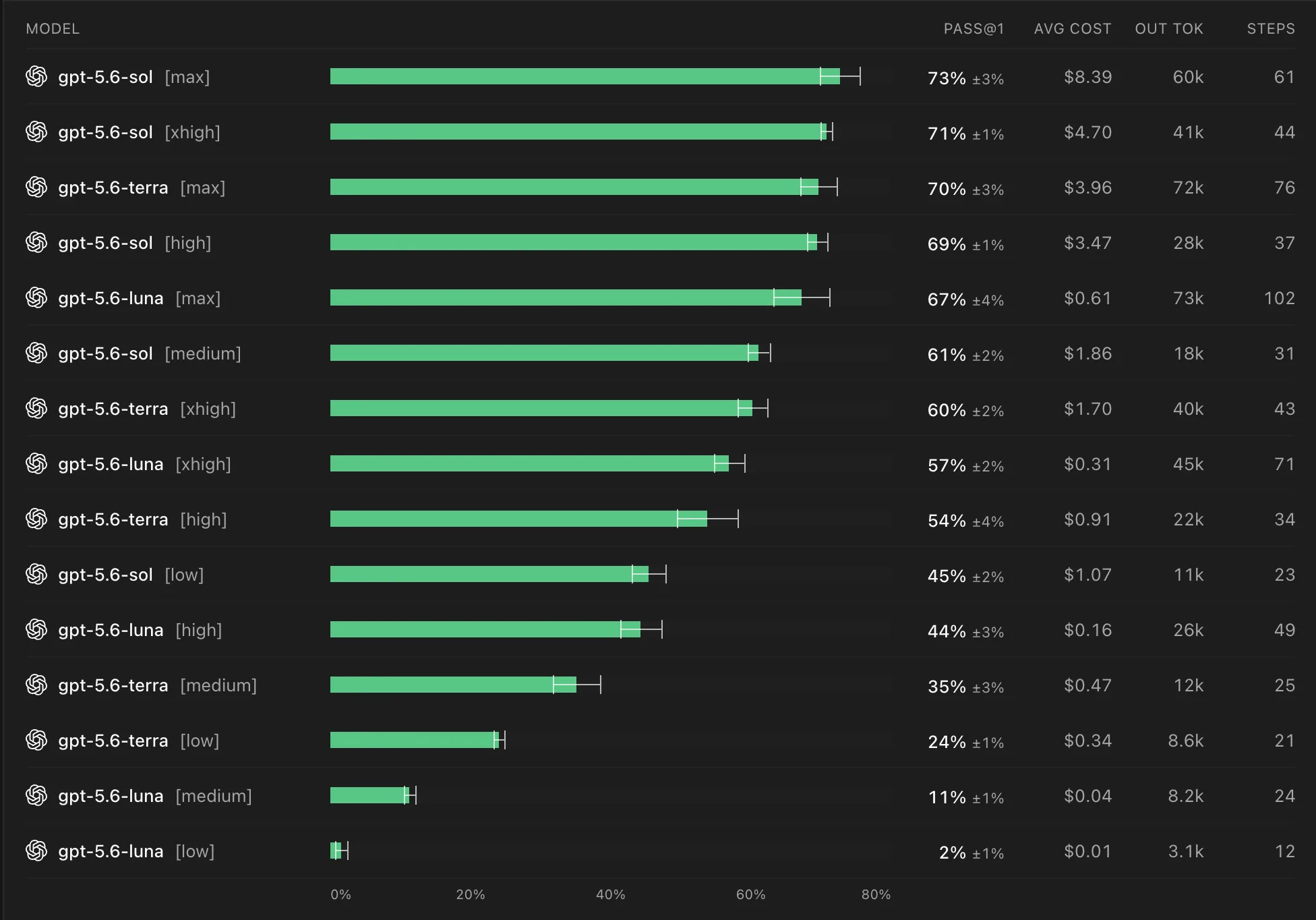
Luna Xhigh is a deliberate exception to the curve rule. Xhigh does not sit at the most efficient point on the Luna curve. Still, it can make sense when the dollar cost matters more than finished tasks per minute.
Yet the biggest hidden cost lever lies between these profiles. If you switch reasoning, model, or speed mode in the middle of a long session, you risk losing your prompt cache.
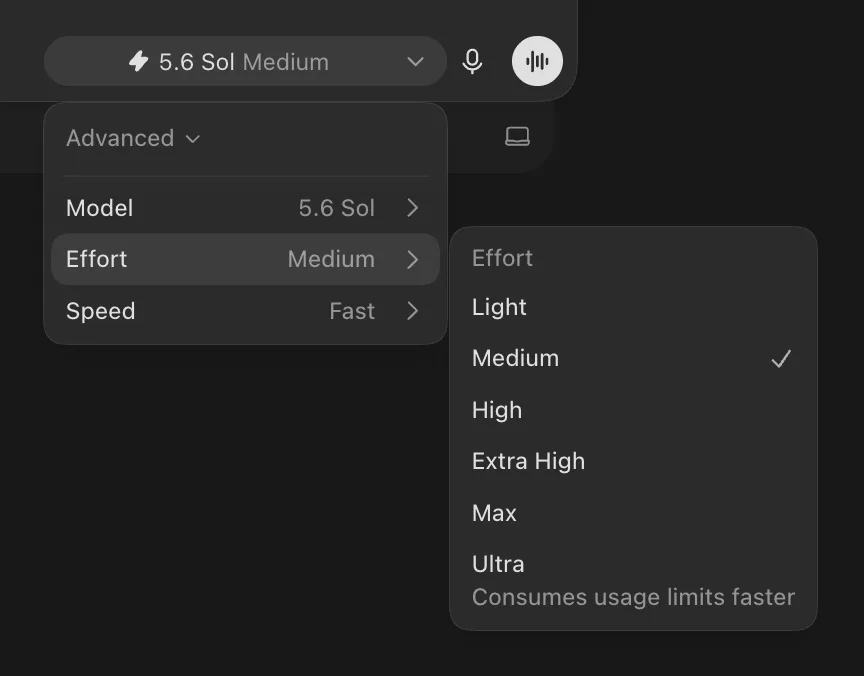
According to OpenAI's caching guide, prompt caching requires an identical prefix. Reasoning effort sits at the beginning of the context. Switching it alters this prefix. Consequently, the next turn may process the entire window cold from scratch.
In a context with 250k tokens, that is no minor detail. Switching back does not restore the previous cache; it can simply trigger a second cache miss. Fast mode can cause a similar effect due to differing processing or routing.
1. Choose the profile before the session
Begin planning, problem-solving, and implementation with a deliberately selected profile. Stick with it throughout the session.
2. Offload difficult questions
Use a fresh Sol High session or a subagent for a tough problem. Do not simply ramp up an existing, long Sol Medium session.
3. Hand off implementation cleanly
Transfer the plan, decisions, and open points compactly into a fresh Terra High session. This ensures implementation starts with clean context.
4. Compact before unavoidable switches
Compacting does not salvage the old cache. However, it reduces the context window that has to be reprocessed after the switch.
When it comes to speed modes, Standard remains my default. I only use Fast when waiting time is the genuine bottleneck, and in those cases, I start the session with it deliberately. Ultrafast remains in preview and, due to open questions around pricing and availability, is not yet a dependable recommendation for everyday use.
Not a single winner, but clean routing
My setup is straightforward: Sol Medium plans. Sol High tackles hard problems. Terra High implements. Luna Xhigh saves money when longer runtimes are acceptable.
And I do not switch between these profiles carelessly mid-task. Clean handoffs are far cheaper than invisible cache misses.